JSONedit
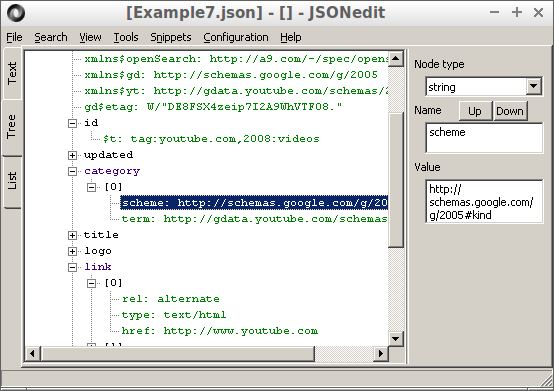
JSONedit is a simple JSON editor with text, tree and list view. Complete application (single executable file)
weights about 2 MB (statically linked Lua and Scintilla included),
does not require installation and does not depend on any non-standard dll.
Settings are stored in .ini file created in application directory, so you can call it portable.
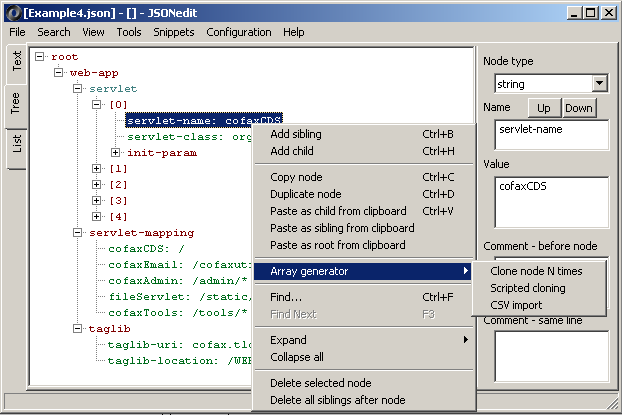
Limitations: no Unicode support. Keep in mind that UTF-8 text with characters limited to 0x00 to 0x7F codes (7-bit) is equivalent to ASCII. Also, if you're using additional characters from single codepage only (your Windows default), then external to/from Unicode converter might come to help. Note: UTF-8 support is present in test version 0.10.
With some limitations program runs under Linux + WINE. Tested JSONedit 0.8 under WINE 1.3
cannot edit large files (very slow operations comparing to Windows) and has problems with
immediate tree redrawing when i.e. cloning node multiple times. WINE 1.6.2 seems to work slightly better
License: freeware (free as in beer).
Scroll page down for downloads.
- 2010.05.12 Version 0.1.
- 2010.06.24 Version 0.2.
- removed ridiculous default RichEdit text length limit,
- empty array no longer changes to null object upon conversion from object tree to text,
- added standard items (Undo/Cut/Copy...) to text editor,
- added Copy/Paste as sibling/Paste as child to JSON tree context menu; when exchanging data with clipboard JSON text format is used - you can copy any text representing valid JSON object to clipboard and paste it as tree node,
- added dialog to change parent type when trying to add child to node other than array or object.
- 2010.07.27 Version 0.3.
- removed cc3270mt.dll dependency,
- added find in text function for text editor view.
- 2010.08.19 Version 0.4.
- storing active view (tree or text) selection in ini file,
- F3 = Find Next (searching still works in text view only),
- name and type of root branch/object and name (representing index like [0], [1],...) of array item is not editable to prevent confusion,
- when using auto-update in tree view and editing integer or float value data is not updated if current text is empty or it is just "-"; prevents annoying exceptions when erasing previous text or trying to enter negative number,
- tree nodes are reused when loading new structure - nodes will stay expanded and in the same position when loading new file if similar (comparing name paths) nodes existed in previous structure, this is helpful when comparing two JSON files,
- added some trivial node moving through "drag and drop".
- 2010.08.30 Version 0.5
- FIXED regression: huge CPU usage when parsing arrays with large item numbers introduces with tree reuse; this fix does not apply to objects with large children count - if you're working with large data sets (few MB or more) you may want to turn off tree reuse function (Settings/Editor),
- name of file to open can be passed as command-line parameter,
- Settings window: added button to associate .json files with application,
- default directory for file open/save is stored in ini file,
- GUI responsiveness improvement: text update is delayed until text is needed when editing nodes in tree mode,
- added "Expand all" and "Collapse all" to tree context menu.
- 2010.09.14 Version 0.6
- FIXED: default directory was updated only when opening file using command line,
- handled dropping file to application window action,
- large speed-up of recursive expand/collapse functions,
- added "Reformat" tool; files formatted in a same way (indented formatting is much useful here that compact formatting) are easy to compare or merge with common tools intended to work with plain text files (WinMerge, "Compare By Content..." from Total Commander),
- added selection of output text formatting (compact or indented); selected format is used when generating text based on tree structure, copying tree node to clipboard and reformatting text,
- added option to search backwards in text view,
- added searching inside tree (comparing with node names, node values or both); float values are matched with 1% accuracy margin.
- 2010.09.18 Version 0.6.1
- FIXED: no quotation marks around command line parameter written to registry when associating with .json files - problem with opening files located in folders with space in it's name; if you've associated application with .json files previously, you have to use "Associate" button again to write new command line string,
- root node is expanded when parsing new text.
- 2011.02.28 Version 0.7
- changed "drag and drop" behavior: default action is copy, if shift is pressed node is moved; added custom copy/move cursors similar to used by Windows Explorer or Total Commander,
- added Most Recently Used files list,
- added File/New menu item creating empty "root" node (setting text to "{}"); "{}" is also set as default text at startup,
- minor fixes: renaming moved node parent subnodes on "drag and drop" (keeping array elements index text consistent with real index), checking if there is no duplicated node name when copying/moving nodes, set minimal width and height of main window, set anchoring for node name/value edit fields.
- 2011.05.27 Version 0.8
- FIXED: incorrect matching when searching for node values, i.e. "1." was matched with integer type node with value = 1,
- added "Clone N times" to node context menu,
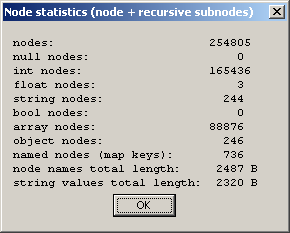
- added simple node + its subnodes statistics (intended to help with memory usage
estimation for DOM parser).
- 2011.11.05 Version 0.8.1, thanks to Tito Bouzout for suggestions
- added file name and directory to application title,
- added File/Save (previously: only File/Save as... available) to menu,
- changed string value editor to multiline; node name is still edited as single line,
- when editing int or float node incorrect input (text that is not a number representation) is indicated with red color instead of default exception message,
- FIXED: incorrect int/float node values when node type was changed to int/float and node value was not a valid number; falling back to previous type if invalid node value was not corrected.
- 2012.03.03 Version 0.8.2
- FIXED: object with no children no longer changes to null type when converting from tree to text,
- user interface clean-up
- removed "Parse and update" from text editor context menu; text is parsed if it was changed each time when switching from text view to tree view,
- "Node statistics" moved from context menu to "Tools",
- removed "Update node" button and "Update immediately" checkbox as most likely useless ("Update immediately" never unchecked by the users),
- new file (File/New) gets default name "New1.json", "New2.json", etc.,
- added warning dialog regarding unsaved changes in current file when opening new file or closing application,
- unsaved changes: marking a modified file in the editor with an asterisk next to its name,
- added JSON examples to Help menu: examples from json.org, miniscope v4/sig_test.dll configuration and gdata.youtube.com search query result.
- 2012.03.10 Version 0.9
- added CSV import function (CSV to JSON converter),
- node names edited as multiline - most likely not useful, but allows testing import of CSV files with newlines inside quoted fields.
- 2012.03.15 Version 0.9.1
- FIXED: unacceptable precision reduction when printing floating point values (thanks to eyemedia for the report),
- FIXED: when unparseable text was pasted with "Paste as root from clipboard" RMB menu option few times it was multiplied in text editor.
- 2012.05.12 Version 0.9.2
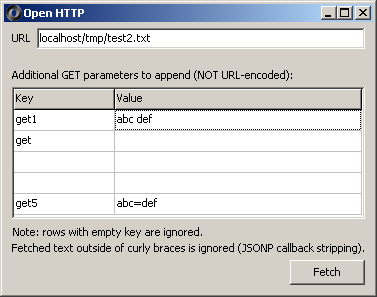
- added simple HTTP client with JSONP callback stripping
(thanks to Tielman de Villiers for the suggestion).
- added simple HTTP client with JSONP callback stripping
(thanks to Tielman de Villiers for the suggestion).
- 2012.07.13 Version 0.9.3
- added few shortcuts (Ctrl+S, Ctrl+Shift+S, Ctrl+N, Ctrl+O), thanks to Martin for the suggestion.
- 2012.08.01 Version 0.9.4
- added option to keep names of the nodes copied through clipboard (additional JSON wrapper is holding node name); by default copy/paste still uses plain JSON representing node; thanks to Peter for the suggestion. This option is limited to copying from/to JSONedit. If two JSONedit instances are used as source and destination it has to be enabled in both instances to work correctly.
- 2012.08.08 Version 0.9.4.2
- fixes related to multi-monitor environments: Position changed to poOwnerFormCenter, modified standard dialogs behavior; thanks to Peter for the suggestion.
- 2012.08.15 Version 0.9.5
- FIXED: disappearing node type selector when reducing window size,
- added array generator using embedded Lua interpreter.
- 2012.09.09 Version 0.9.6
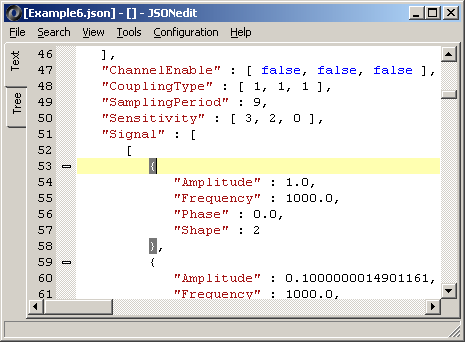
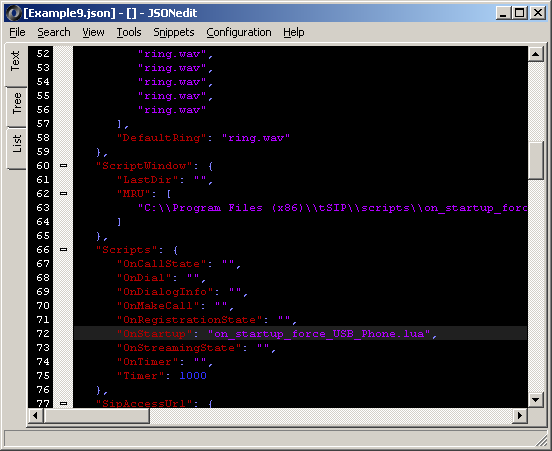
- changed text editor from TRichEdit to Scintilla -
syntax highlighting, code folding, braces matching, line numbering. This is relatively big
change, so in case of problem - as always - try previous version.
- changed text editor from TRichEdit to Scintilla -
syntax highlighting, code folding, braces matching, line numbering. This is relatively big
change, so in case of problem - as always - try previous version.
- 2013.01.21 Version 0.9.6.1
- FIXED: document content was reverted back when "Reformat" was used after new text was entered in text mode. It was hidden if view was switched to tree. Thanks to Dan Hersam for the report.
- 2013.02.11 Version 0.9.7 -
adding support for comment (which by the way you shouldn't use unless you've got really good reasons)
- collecting comments by parser - configurable option,
- displaying and editing comments in tree view; using javascript-style comment marking with // or /**/ is required, on the other hand line and block comments (or even empty lines) can be mixed freely,
- tree editing panel width is stored in configuration.
- 2013.03.09 Version 0.9.7.3
- FIXED: comment edit control color not reverting back to normal after entering incorrectly escaped comment and switching node,
- FIXED: parsing/validating JSON: generating error when non-white characters are found after closing bracket (typically due to misplaced closing bracket in the middle of text), thanks to Toshiyuki for reporting,
- added partial font selection (for tree control, for Scintilla text editor and for editing controls) as suggested by Sungwook.
- 2013.04.04 Added ListJson.wlx - JSON viewer plugin for
Total Commander (32-bit only) based on JSONedit code. Function set is limited and I believe only
usage of this plugin would be Total Commander Quick View function (Ctrl+Q).
- 2013.05.07 Version 0.9.7.6
- FIXED: after launching JSONedit using command line and relative path to edited document Save function worked as Save as displaying save dialog with initial directory different that source directory (thanks to Michael for reporting); source paths are converted and stored in history as absolute,
- F2 in tree view is assigned to in-place node rename (suggestion from Samuel),
- new option for JSON parsing: treating control characters (U+0000 through U+001F) inside strings as errors (stricter parsing - suggestion from Michael).
- 2013.12.10 Version 0.9.7.8
- new file is created when file specified with command line does not exist,
- tree view: assigned Ctrl+C (copy node) and Ctrl+V (paste as child) shortcuts.
- 2014.03.08 Version 0.9.7.9
- tree view, context menu: added (beside "Expand All") function expanding 1 to 5 nested levels,
- Help: added RFC 7159, RFC 4627 and RFC 5234 (ABNF) text,
- FIXED: previously manually changing root node type was not allowed - RFC 4627 states that json text can be object or array, updated RFC 7159 allows any type,
- tree view: null value is shown in same way as true/false.
- 2014.05.24 Version 0.9.7.12
- FIXED: Ctrl+C/Ctrl+V shortcuts action now depends on currently active component, i.e. it copies text when edit field is active but copies whole nodes when tree is active (thanks to Michael for reporting regression),
- FIXED: missing focus when switching from text view to tree view and back,
- Scintilla caret width increased to 2 pixels.
- 2014.06.16 Version 0.9.8
- Tools: C++ class generator (experimental)
- 2014.08.24 Version 0.9.9
Improved keyboard-only workflow and few other minor tweaks, thanks to Brother Gabriel-Marie for suggestions and testing:- configuration: added option to disable Tabs in tree view edit controls (use Tabs to move focus rather than character),
- added Up/Down buttons for reordering array elements (+ replacing "Node name" with "Node index" for array elements),
- added *.txt filter to open and save dialogs,
- configuration: added option to select text in edit control on entering,
- disabled TabStop property for TPageControl in editor (most likely just unnecessary step when cycling through controls with Tab),
- assigned shortcuts for "Add child" (Ctrl+H) and "Add siblings" (Ctrl+B) actions in tree view,
- settings: added "running with admin rights required" note next to button associating application with *.json files,
- resized "About" window for better license texts readability.
- 2015.07.26 Version 0.9.10
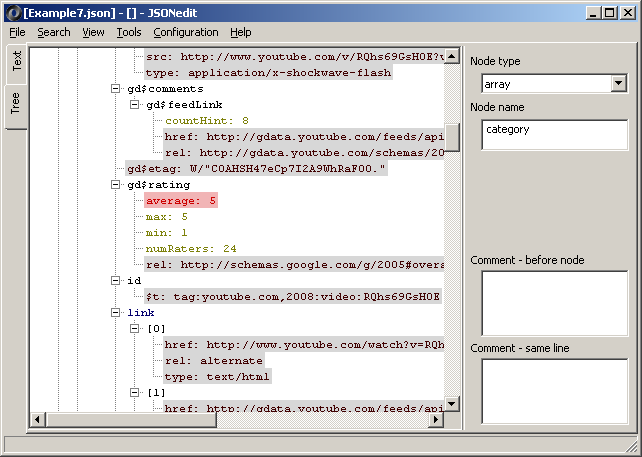
- tree view: coloring nodes (text + background, see new configuration page added) according to their type
- 2015.08.30 Version 0.9.11
- Array generator: added CSV import to tree context menu (2 out of 3 conversion styles available)
- View/Line wrap (or Ctrl+W): toggle line wrapping for text view
- switching immediately to text view if opened file could not be parsed
- search dialog: supplying as default text selected from text view or text from selected node
- 2015.09.16 Version 0.9.11.1
- long-awaited (thanks for suggestions to Michael Maron, Sean Sherrard, B.G.M., Todd Matthews, Darwin Sanoy) option to keep object elements order preserved (Settings/JSON, by default old behavior is kept, that is object elements are sorted alphabetically by name)
- auto-expanding root node after switching from text to tree if text was changed and after pasting text as root from clipboard
- 2015.09.17 Version 0.9.12
- object elements sorting if disabled (order is preserved) in default configuration
- tree view: buttons to move elements of the object up/down (available only if sorting is disabled)
- 2015.09.21 Version 0.9.13
- FIXED: not working since 0.9.7.8 "Paste as sibling from clipboard" (thanks for reporting to Darwin Sanoy)
- "Paste as sibling from clipboard" inserts new data immediately after selected node instead of inserting at the end
- 2015.09.27 Version 0.9.14
- checking source file for UTF BOM
- option to skip UTF-8 BOM before passing to parser
- files written to disk by editor are always without BOM - it appears that in many applications UTF-8 without BOM is required
- notifying that UTF-16 and UTF-32 are not supported if file appears to use these encodings
- in-place value editor for tree - assigned to F4 key
- complementary to editing node name with F2
- works with primitive values (string, int, real, boolean)
- string value editing (same as with name editing) is mostly limited to sigle-line text, i.e. in-place editor silently displays multiple lines as single one not allowing inserting newlines (although existing newlines are preserved)
- for boolean value "0" and "1" are accepted as well as "false" and "true"
- log: added execution time measurement for basic operations (parsing and generating JSON, building tree)
- smarter auto-expand (expanding nodes when new text is loaded)
- new setting, number of levels to auto-expand, 1 (default, only root expanded) ... 5
- if number of levels to auto-expand is higher than 1 auto-expanding is continued recursively but stops if number of visible nodes would be higher than 30
- checking source file for UTF BOM
- 2015.11.08 Version 0.9.15
- FIXED issue with incorrect JSON generated for high-precision float point values (1000000000000000.0, 1000000000000000.1 => "1000000000000000.")
- minor fix making double used consequently instead of float
- using 64 bit signed and unsigned integers (instead of 32 bit signed used previously)
- examples: added PaleMoon/FireFox bookmarks file (this example is making use of 64 bit integers)
- few cherry-picked updates for json-cpp
- settings: selectable (default: string instead of previously used null) type for new nodes (add as child / add as sibling)
- settings: option to automatically activate in-place value editor (same as assigned to F4) for newly added nodes
- 2015.11.18 Version 0.9.15.1
- fixed uint64 entry (e.g. 18446744073709551615 = 2^64 - 1) from value edit on right panel
- fixed problem (apparently bug in sscanf TC++ implementation, tested for comparison MinGW behaves correctly) with sscanf and negative (only negative) values with more than 32 significants bits (with TC++ more significants bits are all set to 1)
- fixed/restored out-of-range indication (i.e. red color for edit box) for entered integers / unsigned integers that don't fit in 64 bits
- more precise error location info when parsing/validating text (moving cursor to the column from parser error location - useful for unformatted invalid JSON)
- 2015.12.20 Version 0.9.16
- Scintilla-based editor for Lua (previously used with Script.dll plugin for tSIP softphone)
- Lua scripting window is available from Tools menu (apart from previous array generator available in tree context menu)
- optional preprocessing of name/value entered in tree view with Lua
- 2016.01.30 Version 0.9.17
- Ctrl+A (Select all) works in node name/value/comment edit boxes
- added "Duplicate node" (Ctrl+D) to node context menu; works both with array and objects (manual rename for object children is required to remove name conflicts)
- 2016.04.06 Version 0.9.18
- snippets, stored as JSON files in "snippets" subdirectory
- store selected node with optional description into file for reuse
- load snippet into selected node
- snippets, stored as JSON files in "snippets" subdirectory
- 2016.06.14 Version 0.9.19
- limited printing precision of floating point values from 17 to 16 digits to get rid of nasty 25.7 -> 25.699999999999999 transition after parse + generate cycle
- nicer statistics window: allowing copying text, fixed values align for large files
- search dialog for tree view allows to specify/limit node types, allowing e.g. limiting searching to "0" strings, ignoring all numerical values
- FIXED: pseudo-names for array elements ("[0]", "[1]", etc.) are ignored when searching in tree mode
- 2016.10.08 Version 0.9.20
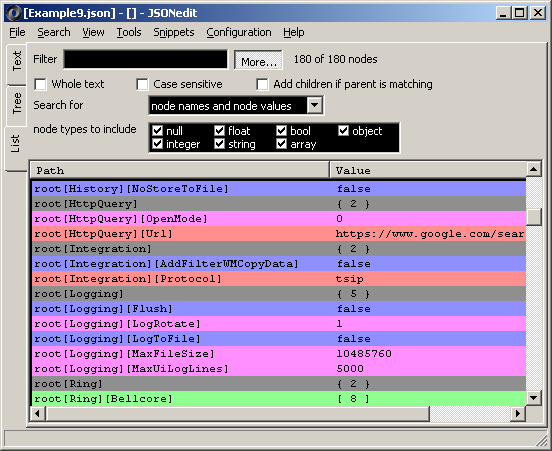
- new view - list - focused on filtering and navigation
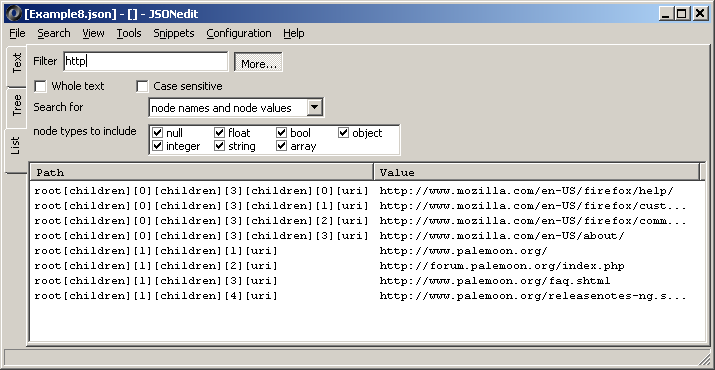
- fast filtering similar to "Find" dialog
- context menu: Go to tree
- basic in-place value editing (Enter or double click, Enter to accept, Esc to abort)
- new view - list - focused on filtering and navigation
- 2016.12.17 Version 0.9.21
- FIXED: after Expand All / Expand # levels tree was scrolled to last expanded node - often seemingly random place
- FIXED: scrolling through array with large number of items in list view was slow
- FIXED: flickering for list view when e.g. scrolling (double buffering)
- added font selection for list view
- node (background + font) coloring works also in list view, sharing settings with tree view
- list view: displaying filtered and total node count
- Tools menu: export content of list view as CSV
- added option to load automatically last file at startup
- 2017.02.11 Version 0.9.22
- Tools menu: experimental, very relaxed pseudo-JSON parser, alternative method of prototyping structures for further pasting into main editor
- FIXED: no brace matching for JSON text view (incorrectly selected Lua highlighter since 0.9.16)
- FIXED: edit panel was not updated (showing still values from document) when document was reloaded in tree view and no node was selected; root node is now selected as default
- FIXED: default directory for file open dialog was not updated if file was loaded using drag-and-drop
- 2017.04.22 Version 0.9.23
- added "Remove obsolete files" and "Clear list" items to MRU lists in main window and Lua script window
- added option to edit in-place tree node value on double click (like with F4)
- nodes can be deleted from list view
- added font selection for relaxed parser tool
- FIXED empty array processing in relaxed parser tool
- FIXED inconsistent state of node edit panel (showing old values until new node is selected after switching to text view, editing and switching back)
- deleting root node resets it to empty object (also fixes "Invalid index" if switching to list view when tree is empty)
- 2017.06.09 Version 0.9.24
- added indentation string (e.g. 4 spaces or single tab, but any string can be used) setting for generated JSON text; current (3 spaces) is left as default
- FIXED empty object processing in relaxed parser tool (following text was ignored)
- List view:
- multiselect
- Copy/Paste (popup menu + Ctrl+C/Ctrl+V) for primitive values
- Copy/Paste (popup menu only) for node names
- added popup menu for node types selection: Select all/none/invert
- added "Add children if parent is matching" filtering option
- FIXED crash when generating JSON text from tree with duplicated node names when type of second node different than type of first node
- CSV import dialog: window size changed to fixed
- 2017.08.20 Version 0.9.25
- "Add node(s)" context menu function in list view; works with multiselect
- adding new nodes to selected nodes as children or siblings
- options to add primitive node types or JSON directly (for objects, arrays or complex structures)
- dialog for changing parent node(s) to either object or array if required
- added node sorting function to context menu for tree and list views; settings for sorting according to ASCII/ANSI order with/without case sensitivity and for recursive sorting; this function is intended to be used with setting preserving node order (default, as opposed to node sorting by JSON parser/generator)
- changed settings format to JSON; application imports old config (.ini) file if new (.cfg) file is not found; note: editing own settings from running application instance would not work as settings will be overwritten when closing application
- added "Delete all siblings before node" to tree view
- delaying list view refreshing when e.g. typing filter text if file contains more than 20000 nodes to prevent typing hiccups
- FIXED: opening Lua script window was changing application title
- FIXED: changing node type selection in list view using space key or context menu was not updating filter immediately
- "Add node(s)" context menu function in list view; works with multiselect
- 2017.10.21 Version 0.9.26
- added setting for string separating name from value in objects (default: " : "); together with indentation string this is supposed to allow to reduce VCS delta for files edited with JSONedit
- FIXED: if last character of indent string was other than space (e.g. single tab was used) generated JSON contained extra newlines
- updated Lua to version 5.3 (as in tSIP) and added some custom Lua functions
- added Lua event mechanism (basically copied from tSIP), there is single "on file save" event at the moment with the purpose of extra formatting / postprocessing
- new setting ("JSON" settings tab, opt-out): validate text as JSON when saving (applies to editing as text only, preventing accidentally saving invalid JSON)
- added new menu item: File / Open current file directory
- Tools: added JSON streaming viewer (newline separated JSON values: NDJSON/LDJSON/JSONL format)
- modified settings window (categories on the left)
- 2017.12.16 Version 0.9.27
- FIXED: JSON generated by CSV import had names sorted alphabetically even if "preserve order" was selected in JSON settings
- most windows can be now closed with Esc
- default position for C++ class generator and relaxed JSON parser windows changed to centered over main window
- List view: added "Select all siblings", "Select all children" (adding children to selection) and "Select all children after removing current selection" (selecting only children of currently selected nodes)
- List view: "Add node(s)" context menu item splitted into adding as children and adding as siblings
- List view: added "Replace/modify node(s)" using same dialog as for adding nodes
- Lua: added GetText() function, returning whole document
- Lua: added "on file open" event
- Help: added RFC7493 (I-JSON / interoperability) and RFC8259 (Dec 2017 update for RFC7159)
- 2018.02.16 Version 0.9.28
- FIXED: crash after switching to list mode, switching to tree mode, deleting node and switching back to list mode
- JSONL/LDJSON/NDJSON reader window can interpret whole file as array and load it as single JSON (assuming file is not too large)
- selected array can be exported as JSONL/LDJSON/NDJSON (Tools menu)
- "Node statistics" works also for node selected in list view (taking first selected node)
- FIXED: node statistics was incorrectly classifying selected node always as named node
- storing and loading snippets works also in list mode (taking first selected node)
- Scintilla: added JSON lexer (different colors for keys and values, invalid syntax in red, also underline for links); previous lexer (C++) is left as default (Settings/Text View)
- FIXED: margin width for text windows with line numbers was incorrectly calculated in some cases (e.g. after loading Palemoon bookmarks example and copying it four times below)
- list view: number of children is displayed for objects and arrays
- list view: added Ctrl+T as shortcut for "Go to tree"
- 2018.04.15 Version 0.9.29
- added hotkeys mechanism as in tSIP - binding key combination(s) to specified action(s)
- action: running Lua script
- actions: switching between compact and formatted JSON modes and reformatting
- added Lua functions OpenNdjsonViewer() and LoadNdjsonFile(filename)
- added Lua script examples (Help menu of Lua scripting window, can be saved as separate file and then be executed by hotkey)
- fetching/loading HTTP content using curl and digest authentication
- fetching/loading NDJSON from HTTP using curl
- Lua scripting window is now not modal (except for cloning nodes function); multiple windows can be opened same time
- list view: added "Expand tree to show selected nodes" menu item - showing more context for selected nodes
- added File/Start new app instance menu item
- Tools: Find duplicated values (from list view)
- settings: added two color templates for tree and list view (colors are pretty much random) and template with default/system colors
- Ctrl+F in list view moves focus to filter edit control
- added "Paste text from clipboard" to NDJSON viewer
- added hotkeys mechanism as in tSIP - binding key combination(s) to specified action(s)
- 2018.06.17 Version 0.9.30 JSONedit_0_9_30.zip
- more text is visible in NDJSON viewer directly (up to 400 characters per line)
- ID (order starting from 0) is displayed for NDJSON lines
- added: File/Reload and equivalent hotkey action type
- checking if file was changed on disk (opt-in) with options to reload automatically; probably works best with "Reuse tree" option
- Lua:
- added SetViewType(type) function where type = 0 for text, 1 for tree, 2 for list view; be careful when using in situations when view switching would be normally blocked (scripted array generator) as it may break coherency
- added "on startup" and "on timer" script events
- FIXED: no immediate view update and possible crash if SetJsonAsRoot() was used when list view was active
- duplicated values search dialog can export results as CSV
- default configuration: number of levels to auto expand increased from 1 to 3
- increased configuration limit of levels to auto expand from 5 to 10
- added hotkey actions:
- "expand: default" - expanding nodes same way as after new JSON is loaded (roughly - to fill no more than single screen)
- expand all
- collapse all
- search dialog: previously entered text (or text from active node) is selected when window is shown
- 2018.10.17 Version 0.9.31 JSONedit_0_9_31.zip
- FIXED: if change made with in-line editing in tree (F4) was confirmed - displayed node text was missing node name
- FIXED: if Delete key was pressed when using in-line editor in tree or list mode - whole node was deleted
- FIXED: Ctrl+C/Ctrl+V is now working inside in-line editor and filter field in list view
- dialogs requesting changing parent type to object/array for tree and list view can be closed with Esc
- JSON writer: lowered printing precision for double from 16 to 15 digits (roundtrip fail for e.g. value = 79.9)
- added option for UTF-8 to ANSI conversion (file loading) and ANSI to UTF-8 (file saving) - this would be valid for editing UTF-8 files with characters limited to current windows code page, i.e. single language
- added decoding \uXXXX UTF codepoints to ANSI if option for UTF-8 to ANSI conversion is used
- added option to add scrollbars to node value edit field
- added splitter between control groups for editing node value and for editing node comments
- 2019.03.21 Version 0.9.32 JSONedit_0_9_32.zip
- added more color settings and "dark" template for tree and list view, "dark" color schemes for text view (C++ and JSON lexers)
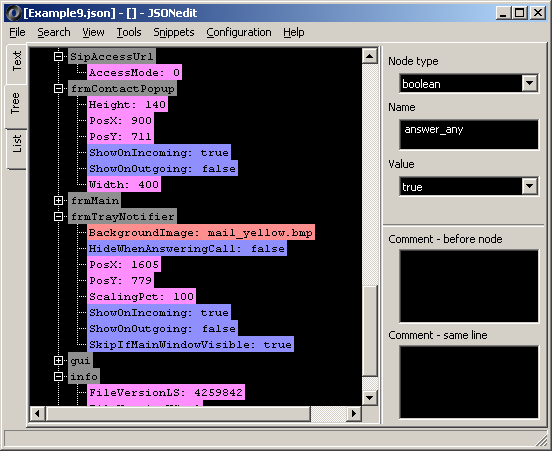
(also: list, text) - more node statistics: maximum nesting level, maximum string value length, maximum name (key) length
- added tSIP configuration file to examples
- changed log window to used in tSIP
- added Lua cheatsheet - as in tSIP
- added Lua ReloadFile(evenIfNotSaved) function; if evenIfNotSaved parameter is equal to 0 then dialog is displayed if file was modified inside editor
- FIXED: suboption "even if file was modified inside editor" for "Monitor file on disk for changes"/"Update file silently" was not working
- added MRU files list for NDJSON viewer
- Lua script and NDJSON viewer windows are accepting files with drag-and-drop
- added Lua example: FTP upload with curl
- "Add node as sibling" tree context menu option adds node immediately after selected (same as "Duplicate node")
- CSV import dialog settings are stored in configuration file
- floating point values are held as strings, allowing to keep e.g. trailing zeroes
- added more color settings and "dark" template for tree and list view, "dark" color schemes for text view (C++ and JSON lexers)
- 2019.06.08 Version 0.9.32.2 JSONedit_0_9_32_2.zip
- FIXED: 0.9.32 issue with color for value edit in tree view always reset to default after switching nodes or if floating point value was validated
- FIXED: 0.9.32 issue with editing floating point values on systems with locale settings using other decimal separator than "."; for consistency dot is now used as decimal separator all the time
- added option to copy node(s) path (tree and list views) in a form of JSONPath dot notation or bracket notation
- added hints to comment edits explaining that // or /* */ comment marks are required
- 2019.10.30 Version 0.9.33 JSONedit_0_9_33.zip
- tree view: added setting to use extended description for object nodes, with values of some child nodes added to parent node caption; this might help distinguish array nodes without expanding them
- option to specify up to 3 names of preferred child nodes (e.g. ID, description, ...)
- option to use only child nodes with names from preferred set
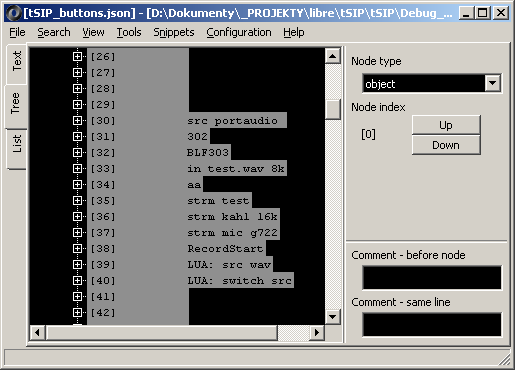
- tree view: new opt-in feature: navigation panel showing current location in the tree and allowing to jump to parent/grandparent/etc.
- tree view: added setting specifying maximum number of nodes visible after auto/default expand (previously: fixed at 30)
- Fixed: dialog for adding new node in list view contained extra newline in default node name
- File menu: added "Copy to clipboard" -> "full file path" / "file name"
- tree view: added setting to use extended description for object nodes, with values of some child nodes added to parent node caption; this might help distinguish array nodes without expanding them
- 2020.08.26 Version 0.9.34 JSONedit_0_9_34.zip
- tree view context menu: added options "Copy as compact JSON" (visible if formatting is set to "styled" in settings or "Named object copy" is used) and "Copy as styled JSON" (visible if formatting is set to "compact" in settings)
- increased number of snippets from 10 to 20
- snippets: added option to copy snippet to clipboard
- snippets: added option to change snippet name (description)
- settings window: additional description for button associating .json files with application
- list view: column widths are stored in settings; range limited to 50...2000
- changed "Clone node" dialog: default number = 1, number can be selected from list or entered manually
- FIXED: incorrect handling of floating point values by relaxed JSON parser and CSV-based array generator; broken since 0.9.32 when these values were changed to being held as strings
- list view: if "Whole text" is not checked - numbers are matched also by substrings
- 2020.10.28 Version 0.9.35 JSONedit_0_9_35.zip
- text view: add option to disable brace matching (highlighting)
- alternative, stream-based formatting is used if text could not be formatted in "regular" way as it is not a valid JSON
- added tSIP buttons configuration JSON examples
- new subeditor for arrays of objects
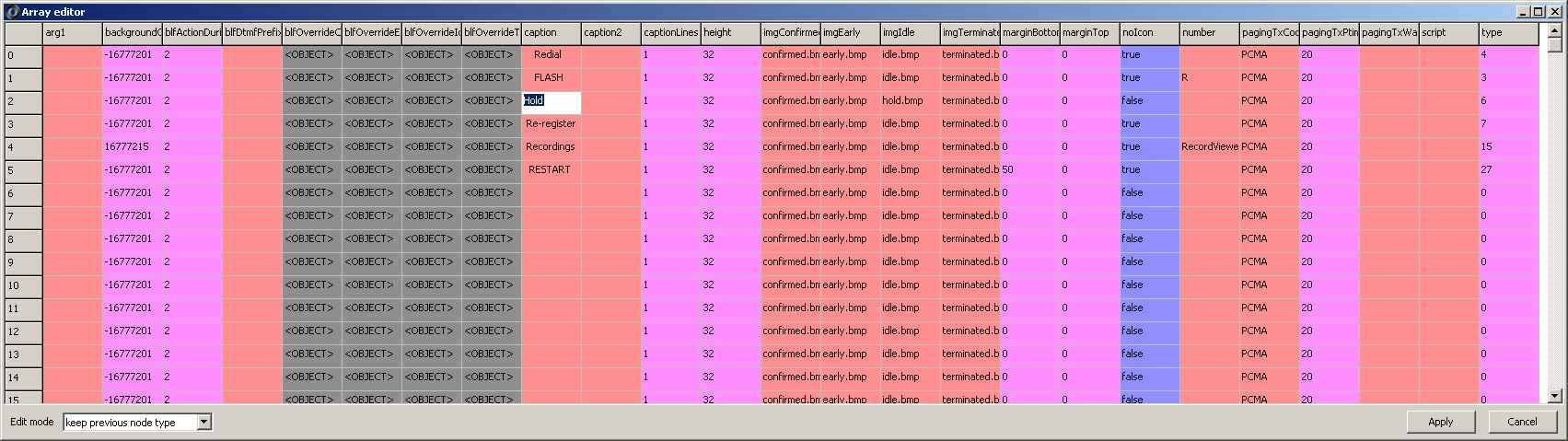
- table view with columns corresponding to names of object elements; <N/A> displayed for array elements not being objects
- double click or [Enter] cell to start editing
- [Enter], [Up]/[Down] or select another cell to confirm edit, [Esc] to abort editing
- "reuse tree" option might be recommended when using editor modes alternatively
- setting to keep previous node type when editing or determine type automatically (like in-line tree value editor with F4 hotkey)
- nested objects and arrays are not handled at the moment (only value type is displayed, although if "automatic node type" is selected they can be changed to simple value)
- using same colors from configuration (now named "Node colors") as tree and list views
- new hotkey type: show array editor
- tree context menu: "Array generator" renamed to "Array tools", holding previous array generator tools and newly added subeditor
- 2020.12.30 Version 0.9.36 JSONedit_0_9_36.zip - mostly suggestions from David Spector
- hotkey settings: width of action type combobox changes depending on selected type (wider for types other than script)
- removed default shortcuts/hotkeys for adding sibling and child to node in tree view; these shortcuts are now opt-in and configurable
- added new action types to hotkey configuration: adding sibling and child nodes in tree view
- fixed Tab order between basic node value edit panel and (optional) node comment edit panel
- after adding new node sibling/child node name (or node text value for array elements) is focused
- changed Lua AddNodeAsSibling function - function takes now two arguments, node name (if applicable) and value - JSON text (previously: on value, node name was always default "<add name>" text)
- Lua AddNodeAsSibling(name, value) inserts new node right after selected node, not at the end
- Lua script window: added AddNodeAsSibling example to help
- tree editor settings: added selection which action would use Ctrl+V shorcut (paste as child or paste as sibling)
- added new action types to hotkey configuration: pasting in tree as sibling and as child
- added new action types to hotkey configuration: changing node type in tree view
- added Lua BringToFront() function - to be used within scripts started by global hotkeys, e.g. combined with fetching file with curl
- fixed problem with keyboard handling when entering script file name to hotkey configuration
- added luacheck integration to Lua editor window (as in tSIP)
- 2021.03.18 Version 0.9.37 JSONedit_0_9_37.zip
- added option to use relaxed parser for text pasted from clipboard ("JSON" settings tab)
- fixed extended object node description disappearing from view after deleting or reordering array element(s)
- tree view: focusing main panel instead of editor by default
- added "Cut node"/Ctrl+X to tree view
- file association: changed "JSONedit File" name to "JSON File"
- new, higher resolution icons from YoYoK3nny; separate icon associated with file
- relaxed parser accepts also strings quoted with single quote (like in javascript)
- added "Copy node with optional key quoting" to tree context menu (copying in javascript-like style, with no quotation around object keys if they are not needed)
- decluttering tree view popup menu - new settings for popup menu visiblity are added, few less used and newest items are hidden with default configuration but can be manually enabled
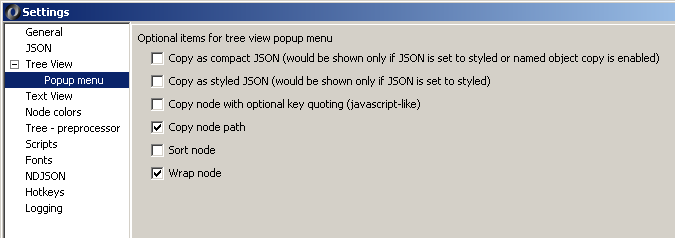
- changed order of items in tree view popup menu
- added "Wrap" -> "in object"/"in array" to tree popup menu (opt-in menu item)
- checking if clipboard has text for "Paste as root from clipboard" function when showing tree popup menu
- NDJSON viewer: fixed paste function and moved to "Edit" menu
- NDJSON viewer: added "Load current content as array to main editor window" function
- fixed true/false value editor combobox disappearing when reducing window height
- fixed inconsistent shortcut for "Delete node" in list view
- fixed common hotkeys (Ctrl+C/Ctrl+V/...) working incorrectly (executing actions from tree view) in script editor window
- 2021.10.12 Version 0.9.38 JSONedit_0_9_38.zip
- tree/text search dialog is now modal
- new settings for search dialog: always on top, transparency level, transparency when deactivated
- changed default show/hide settings for tree context menu items from opt-in to opt-out
- new function: Tools / Copy node as C literal (text to C-like string conversion)
- added "Reformat" button to relaxed parser window
- 2022.03.15 Version 0.9.39 JSONedit_0_9_39.zip
- added some jsoncons tools (with JSONedit_jsoncons.dll, binary is included in main zip)
- JSONPath evaluation
- JMESPath evaluation
- JSON Merge Patch
- JSON Patch
- some refactoring to make it easier to manage multiple editor components and MRU lists
- added some jsoncons tools (with JSONedit_jsoncons.dll, binary is included in main zip)
- 2023.02.18 Version 0.9.40 JSONedit_0_9_40.zip
- FIXED: if tree node reusing option was selected, "Replace/modify node" in list view was causing object children to disappear instead of being replaced
- FIXED: editing node from list view with inline editor was likely to change same time also node currently selected in the tree view
- Tools / JSON Schema (with JSONedit_jsoncons.dll)
- separate Schema window with typical File menu, MRU list, accepting dropped files
- validating document with JSON Schema draft 7
- validation result list with keyword name, location in document and message
- extra context menu items in Schema tree view for setting/changing types and inserting common JSON Schema keywords
- removed unnecessary trailing newline from text generated by "Copy node as C literal"
- Settings/JSON: option to use JsonCpp expression format for "Copy node path" function
- some fixes for C++ class generator
- new hotkey action types:
- show Tools / JSON Schema window
- validate with Tools / Schema
- 2023.08.26 Version 0.9.41 JSONedit_0_9_41.zip
- copied fixes for global hotkey from https://github.com/tomek-o/tSIP/commit/c5e96a157328359bce3fe4648cae1a6b64f1a019
- fixed possible incorrect array elements ordering if reloading file with "tree reuse" option enabled
- fixed possible incorrect object elements ordering when reloading file if JSON is set to preserve object elements order and "tree reuse" option is enabled; this might make reloading slower in some cases
- Lua editor / Help: added list of custom Lua functions (factory-based pattern like in tSIP or VideoPlayerMpv)
- delaying creation of few tool windows until they are needed for the first time
- NDJSON viewer: added File / Reload menu item
- added new hotkey action types: copy document to clipboard as formatted and as compact text
- removed unnecessary trailing newline from JSON generated with compact formatting
- 2024.02.19 Version 0.9.42 JSONedit_0_9_42.zip
- added options to modify some of the menu shortcuts (allowing to redefine them as user hotkeys)
- fixed renaming array elements on the tree after adding/removing elements if extended node description option was used
- added new setting, "JSON"/"Emit raw UTF-8 characters (instead of escaping as hex codes)", enabled by default - keeping backward compatibility
- added new hotkey type: get node(s) path(s) (tree or list)
- added new setting, "JSON"/"Always write arrays as multiline in generated JSON"
- 2025.06.20 Version 0.9.43 JSONedit_0_9_43.zip
- added support for Mozilla MOZLZ4/JSONLZ4 reading + writing (%APPDATA%\Mozilla\Firefox\Profiles\)
- added new setting ("General" tab) showing hidden files and folders in open/save dialogs (enabled by default) to e.g. making navigation to AppData easier
- text view: move cursor to initial location after formatting (to "styled" JSON) to avoid leaving cursor at far right location
- tree view, deleting node: move focus to previous node instead of parent node when deleting last child node
- FIXED: loading snippet to root node was not deleting its children if they were present
- menu: replaced Snippets Load/Store with more clear descriptions
- changed configuration saving, attempting to make it more resilient to unexpected power loss
- 2025.11.10 Version 0.9.44 JSONedit_0_9_44.zip
- added new setting, Tree/"Line endings handling when editing": options to normalize line endings for string values to \r\n or \n
- FIXED big performance issue with auto-expanding nodes when trying to load JSON file large number of node children
- added warning window when loading large JSON files, with link to LJSONedit; file size threshold for this warning is configurable
- updated jsoncons (in JSONedit_jsoncons.dll) to current git (v1.4.3+), using VS2022
- support for JSON Schema Drafts 4, 6, 7, 2019-9 and 2020-12
- 2025.12.14 Version 0.9.44.1 JSONedit_0_9_44_1.zip
- FIXED exception when trying to load file without extension (bug in 0.9.43 and 0.9.44)
- FIXED: text formatter for invalid JSON was dropping last character from the text
- FIXED: left panel in JSON Patch window had "Merge Patch" label, same like in JSON Merge Patch window
- added RFC numbers to JSON Patch (RFC 6902) and JSON Merge Patch (RFC 7386) window names
- added Lua winapi.keybd_event function (WinAPI equivalent)
- highlighting custom Lua functions in Lua editor
- pressing F1 in Lua editor with cursor on custom Lua function opens its help directly
JSONedit UTF-8 branch (v0.10)
LJSONedit - another JSON editor